 Walid Karray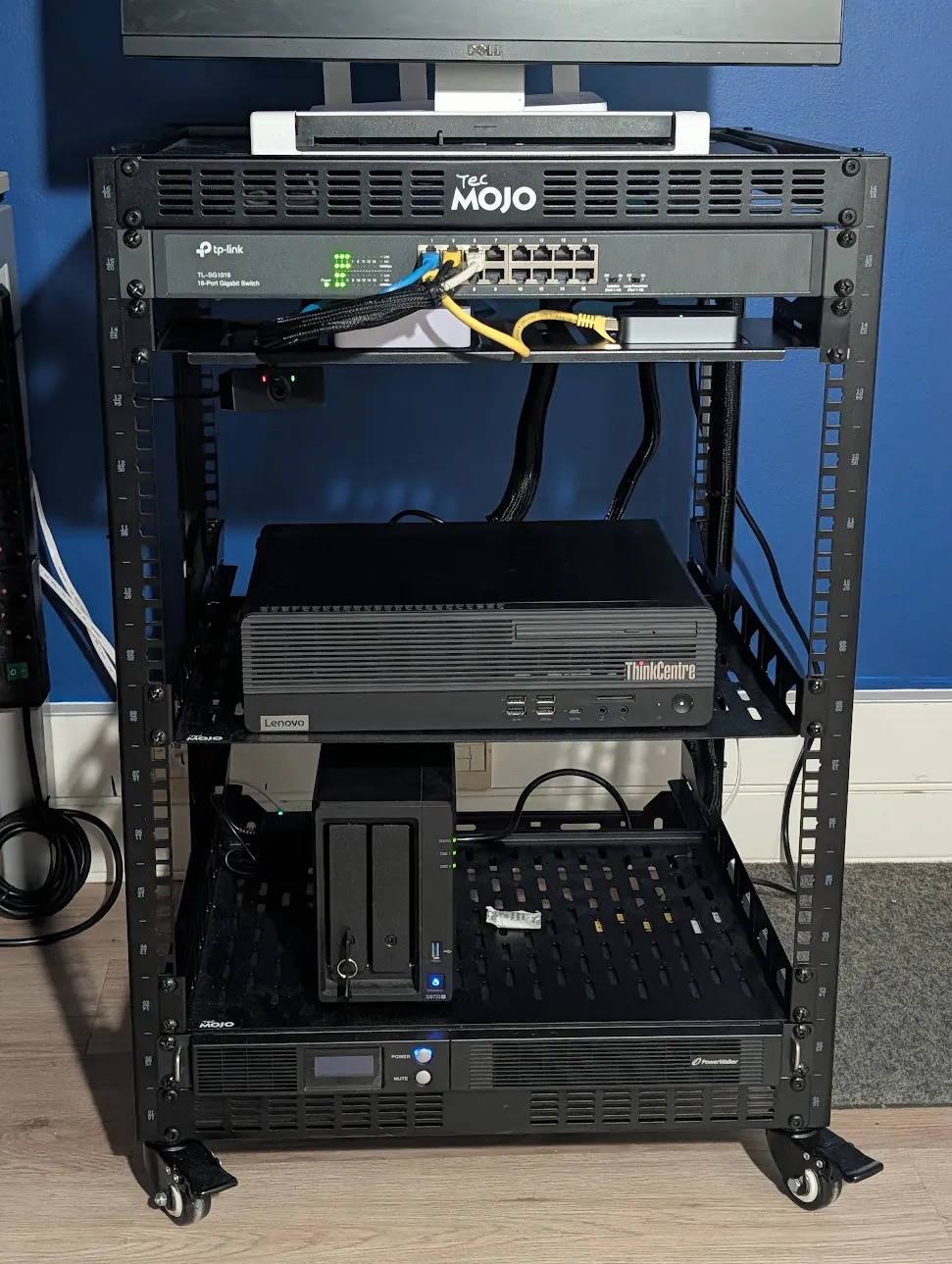
I carry a MacBook Pro, but I don’t really work on it. My work happens in this rack, on two dev boxes where my coding agents run too, next to everything I use daily: Jellyfin, Paperless, my notes, my bookmarks and a local LLM. The rack serves nobody but me, and nothing in it is reachable from the internet.
It all runs on one office PC with Proxmox, and I never log into a server to change it: a push to main is the deployment. Here is how it fits together, from the hardware up.
The rack
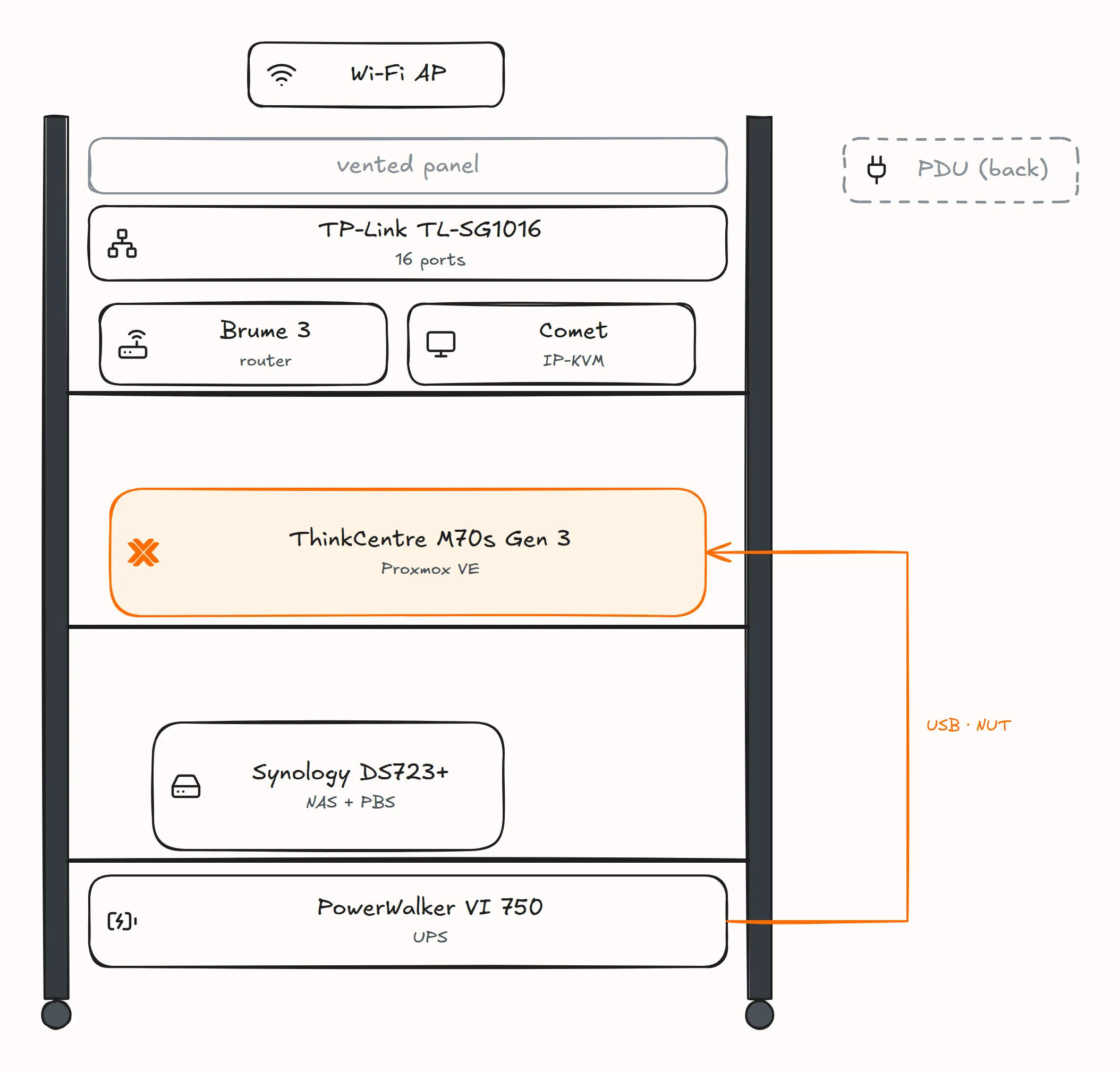
The hypervisor is a Lenovo ThinkCentre M70s Gen 3: an Intel Core i7-12700 (12 cores, 20 threads), 64 GB of DDR4 without ECC, a 512 GB NVMe drive for the system and a 1 TB SATA SSD for the guests, with an Intel I210-T1 card as the uplink. Being an office PC, it has no remote console like iDRAC or IPMI, so a GL.iNet Comet (GL-RM1) IP-KVM sits on its HDMI and USB ports.
Around it, in a Tecmojo 16U open-frame rack:
- a Synology DS723+ with one SSD and one HDD, each its own volume, running Proxmox Backup Server (PBS);
- a GL.iNet Brume 3 (GL-MT5000), a plain home router that the lab uses as its uplink and nothing else, not even for DNS;
- a TP-Link TL-SG1016, an unmanaged 16-port switch;
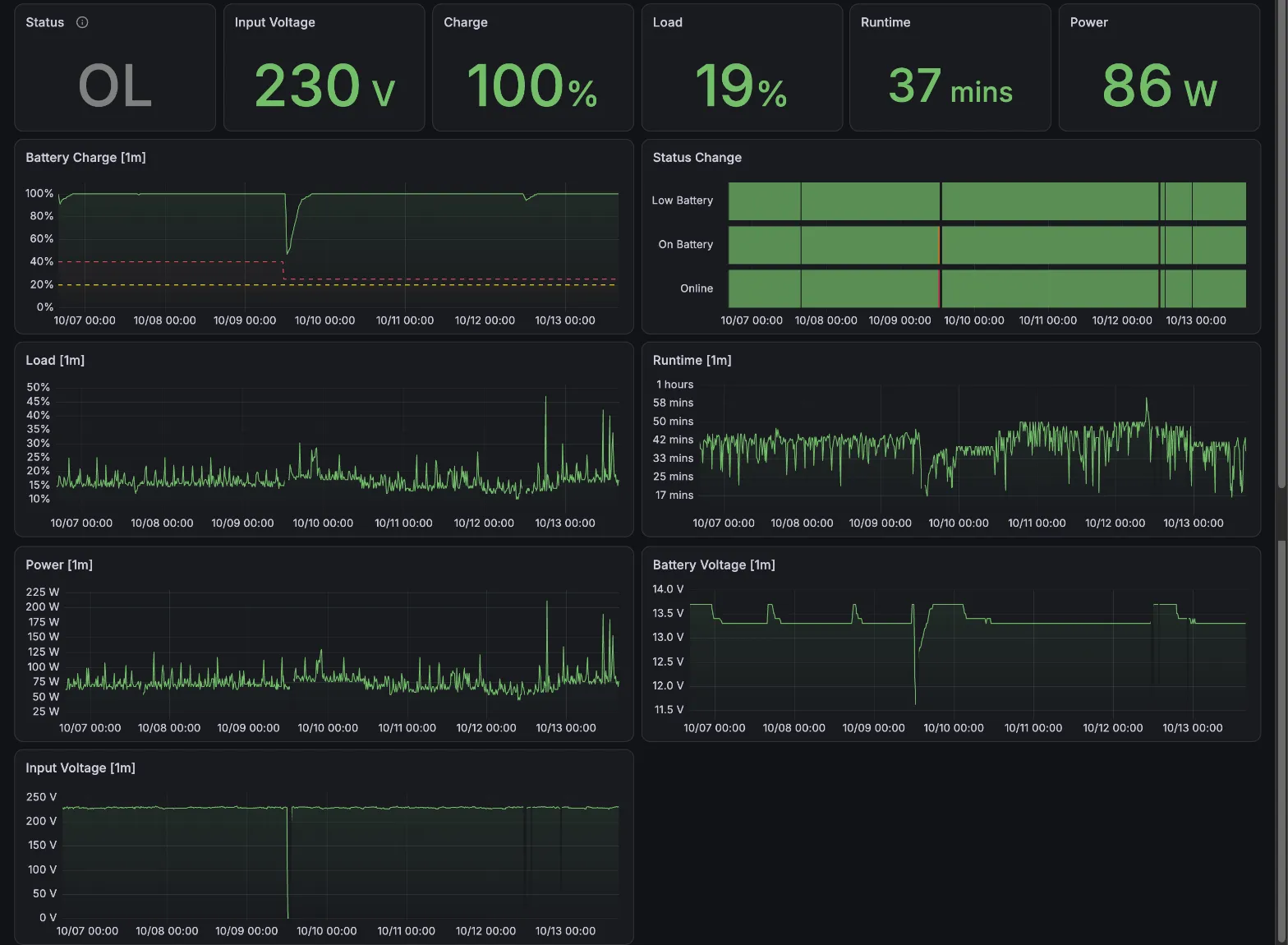
- a PowerWalker VI 750 R1U UPS on the hypervisor’s USB, served by NUT, which shuts down the hypervisor and the NAS on a power cut. What it gets wrong is in My UPS Lies.
The UPS puts the draw at about 72 W on average and 180 W at peak. That is its load percentage times its 450 W rating, so a rough figure, but at €0.18/kWh it comes to around €135 a year with VAT.
What runs on it
Five rules, written at the top of the lab’s docs, decide most of what follows:
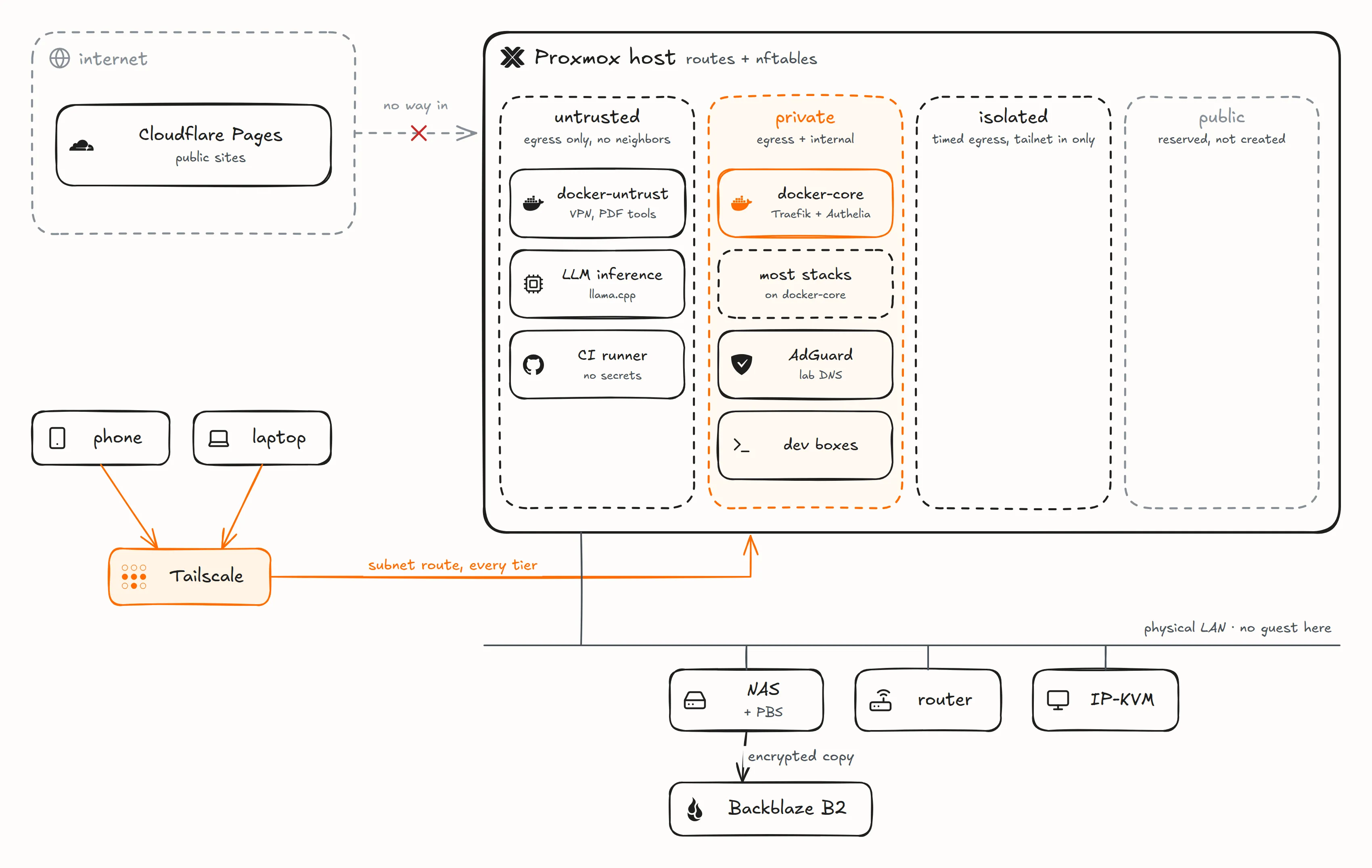
- Nothing public reaches the lab: no inbound port, no tunnel. The public sites, this blog included, are Cloudflare Pages projects.
- Private by default: lab names resolve to a private address, reached through Tailscale.
- One front door: Traefik terminates TLS for every service, and Authelia puts a single sign-on in front of it.
- No guest on the physical LAN: only the hypervisor has an address there.
- Everything is in git, secrets included as ciphertext, and a push to
mainis live within minutes.
On Proxmox VE, most services are Docker Compose stacks inside unprivileged LXC containers, next to a couple of Windows VMs. There is no Kubernetes. I run Docker in LXC rather than in a VM because it is lighter, and it has worked without a problem so far.
Two LXCs carry the Docker stacks, split by trust. docker-core runs 17 stacks behind Traefik and Authelia, each with its own database: Paperless, Outline, linkding, Open WebUI, Presto (my own time tracker), the monitoring stack and more. docker-untrust gets the stacks I don’t vouch for: downloads through a commercial VPN, document conversion with Gotenberg, Stirling-PDF and Tika, and a remote browser.
The other guests do one job each: AdGuard Home as the DNS for my devices, local LLM inference with llama.cpp, a CI runner, and the two dev boxes.
The network is split into tiers, like a cloud VPC
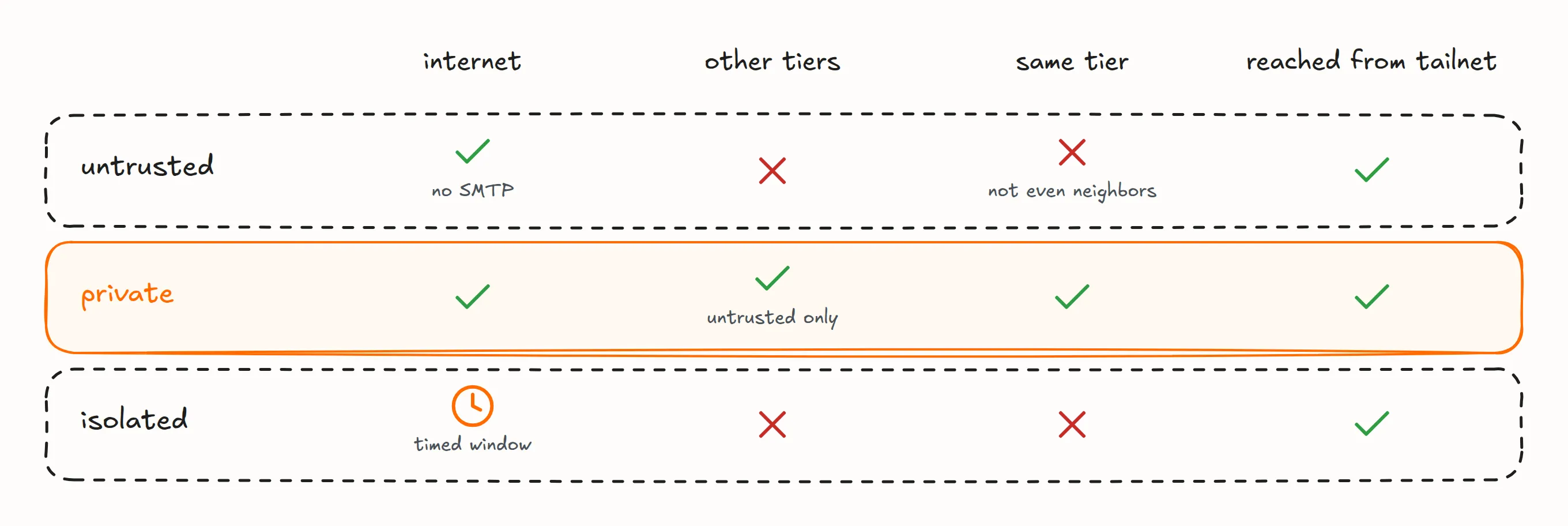
Behind the home router, the hypervisor routes everything. Each guest sits on a Linux bridge, and each bridge belongs to a tier:
- physical LAN: the hypervisor, the NAS, the router and the IP-KVM, never a guest;
- public: reserved and empty, for a tunnel that may come one day;
- untrusted: the internet and nothing else, not even its neighbors.
docker-untrustlives here, with the LLM box, because it loads models from the internet, and the CI runner, because it runs whatever a pull request says; - private: the internet plus the untrusted tier.
docker-core, AdGuard and the dev boxes live here; - isolated: no internet outside a timed window, and nothing gets in but the tailnet.
Each tier is one hand-written nftables table on the hypervisor, so a new bridge inherits its tier’s rules without touching the firewall. After any firewall change, a probe checks the whole matrix above. The guests that guard something also get their own Proxmox firewall rules, the equivalent of a cloud’s security groups. The guests themselves resolve DNS through public resolvers, never through AdGuard, and IPv6 is off.
Tailscale is the only way in
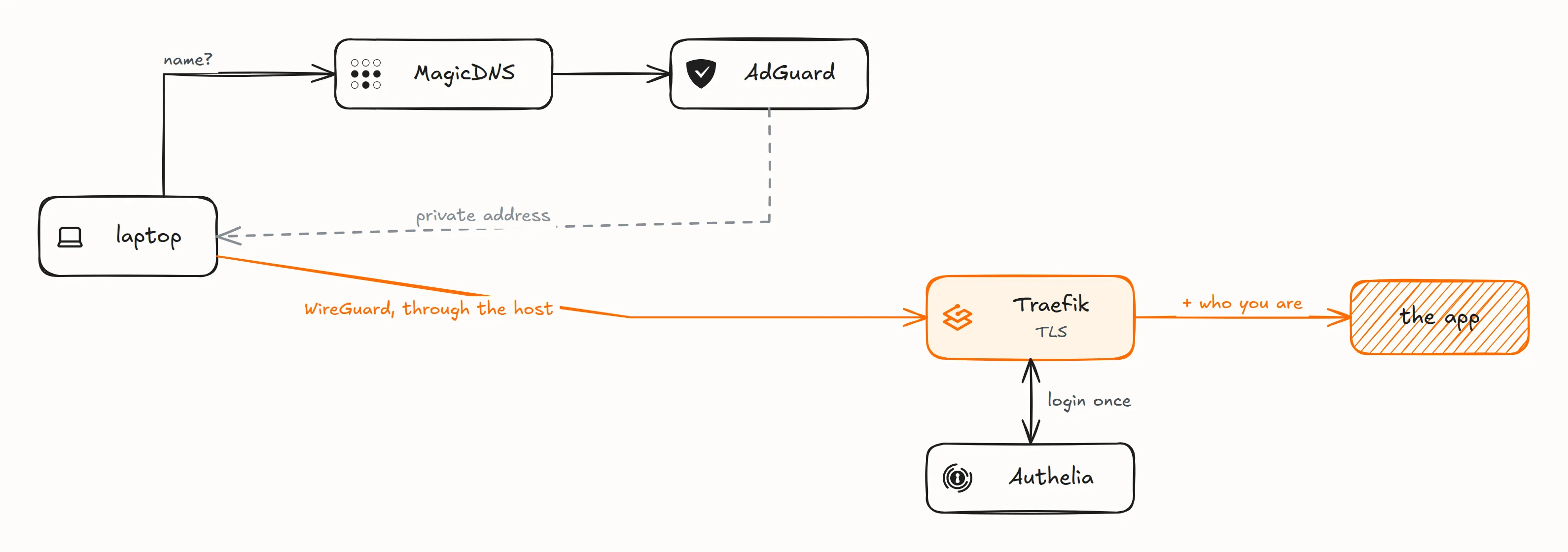
No guest runs Tailscale. The hypervisor advertises a subnet route into the lab, and my laptop and phone reach every guest through it. That keeps a single door and no Tailscale client to maintain in each guest.
Opening an app takes one lookup and one login: MagicDNS sends lab names to AdGuard, Traefik terminates TLS, and Authelia checks who I am once. The public sites never get that far; they stop at Cloudflare.
Names, tags and addresses follow one convention
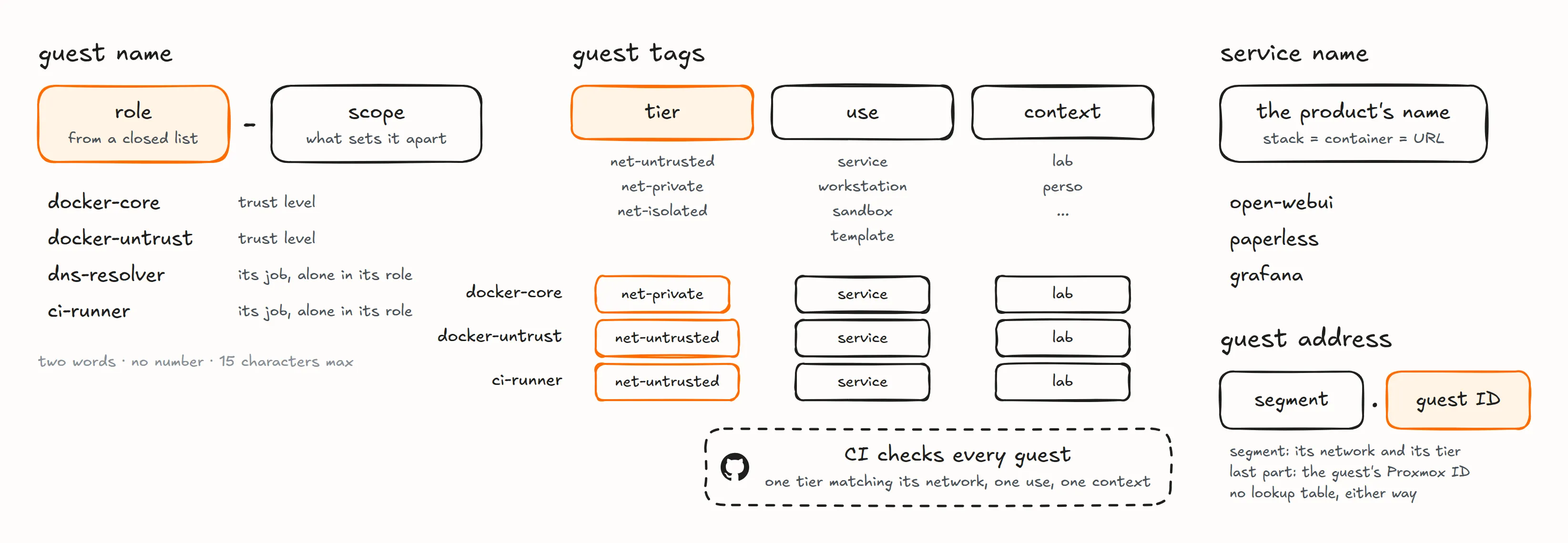
A guest’s name is two words: a role from a closed list, and what sets it apart. No numbers and no brand names, because the name is what shows up in an alert at 3 a.m., and docker-core says what broke. What the name doesn’t say goes into three Proxmox tags, tier, use and context. CI fails if a guest doesn’t carry exactly one of each, or if its tier doesn’t match its network.
Services keep their product’s name: the stack, the container and the URL are all open-webui. And addresses are built rather than assigned: the network part names the segment, and with it the tier, and the last part is the guest’s Proxmox ID. There is no lookup table and no IPAM.
A push to main is the deployment
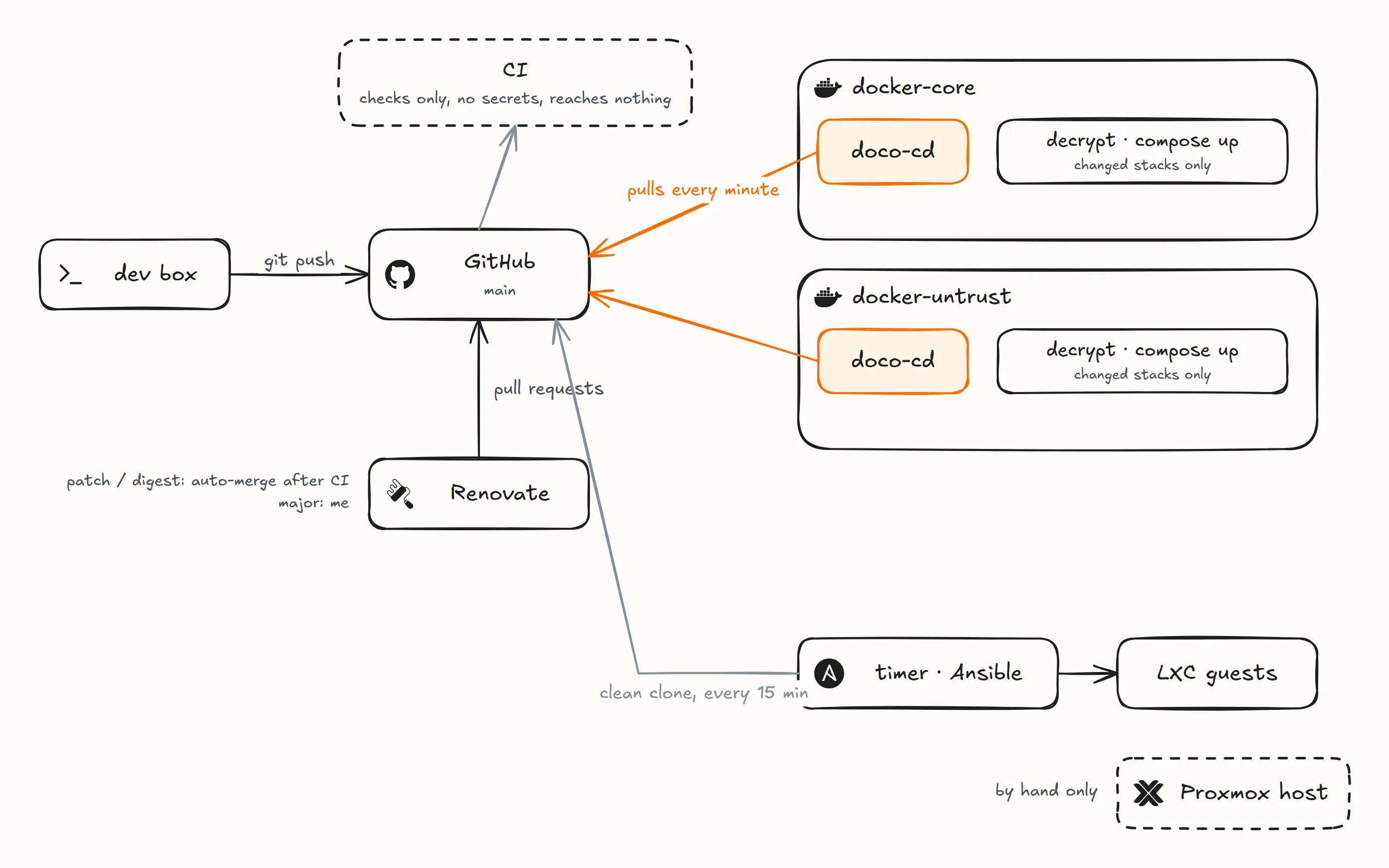
One private repository holds everything: the Compose stacks, the Ansible roles, Terraform for Cloudflare, the Tailscale policy and the docs. CI runs on the runner in the untrusted tier. It lints the repository, scans it for secrets with gitleaks, and holds no credential into the lab. Nothing outside the lab pushes a deployment; two loops inside it pull main.
The first loop deploys the stacks. Each Docker host runs doco-cd, a maintained GitOps tool I chose over writing a script of my own. It polls main every minute, with no webhook and no exposed API, deploys only the stacks that changed, and restarts containers that are stopped or unhealthy. A failed deploy is retried at every poll and raises an alert after ten minutes. Each host lists its stacks in hosts/<host>/.doco-cd.yml, one YAML document per stack:
name: doco-cd
working_dir: stacks/doco-cd
env_files: [../../hosts/docker-untrust/env]
---
name: vpn
working_dir: stacks/vpn
env_files:
  [
    ../../hosts/docker-untrust/env,
    ../../hosts/docker-untrust/secrets/vpn.sops.env,
  ]
---
name: gotenberg
working_dir: stacks/gotenberg
env_files: [../../hosts/docker-untrust/env]
The second loop keeps the system config in line. Every 15 minutes, a timer applies the Ansible roles to the LXC guests from a clean clone of main, so anything changed by hand is reverted at the next run. The dev boxes are left out, since a restart would kill my open terminals. The hypervisor is never on a timer, because that would be a standing root path into it; I apply its roles by hand.
Renovate keeps the versions moving. Patch and digest bumps merge themselves once CI is green, and major versions wait for me. CI doesn’t run the new image, so a bad one shows up as a failed deploy or an unhealthy container, which alerts, and I revert. Undoing anything is git revert and a push. The other side of the coin is that a bad commit reaches the machines on its own too.
Secrets live in git, sealed per host
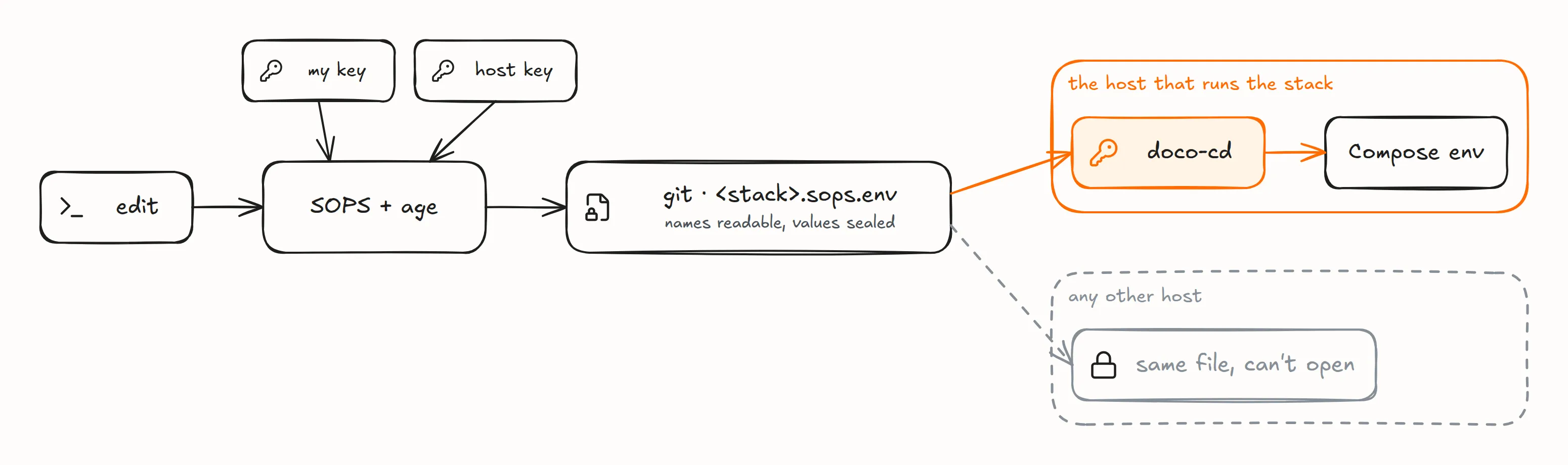
Every secret is committed, as hosts/<host>/secrets/<stack>.sops.env. SOPS encrypts the values with age to two keys, mine and the host’s, and leaves the variable names readable, so a diff still shows which secret changed. Every host receives every file, but its key opens only its own. A secret for a host that has no rule in .sops.yaml is refused rather than sealed to my key alone. doco-cd decrypts at deploy time, onto the host’s encrypted disk.
Compose has one trap here: when a secret is missing, it replaces ${VAR} with an empty string, and the stack comes up healthy with no password. So nothing runs docker compose up -d by hand, and a stack always lands in the same commit as its secret.
I don’t run Vault or any secret manager queried at run time: the repository alone rebuilds the lab, and nothing has to answer at boot.
Backups go to the NAS, then off-site

Every night, Proxmox backs up every guest to PBS on the NAS, over the LAN. PBS keeps 7 daily, 4 weekly and 3 monthly backups and verifies them. It then pushes an encrypted copy to Backblaze B2 in the EU, kept seven days, for the day I lose the whole site. The key that writes that copy can’t erase it: a delete only hides a file, for seven days.

One gotcha worth knowing: Proxmox backups don’t keep a guest’s snapshots, and nothing warns you.

On the hypervisor, the guests live in encrypted LUKS2 volumes. Proxmox itself boots in the clear, joins the tailnet and waits for me to unlock them. The NAS keeps the backups in an encrypted folder as well, so stolen disks give nothing readable.
Monitoring
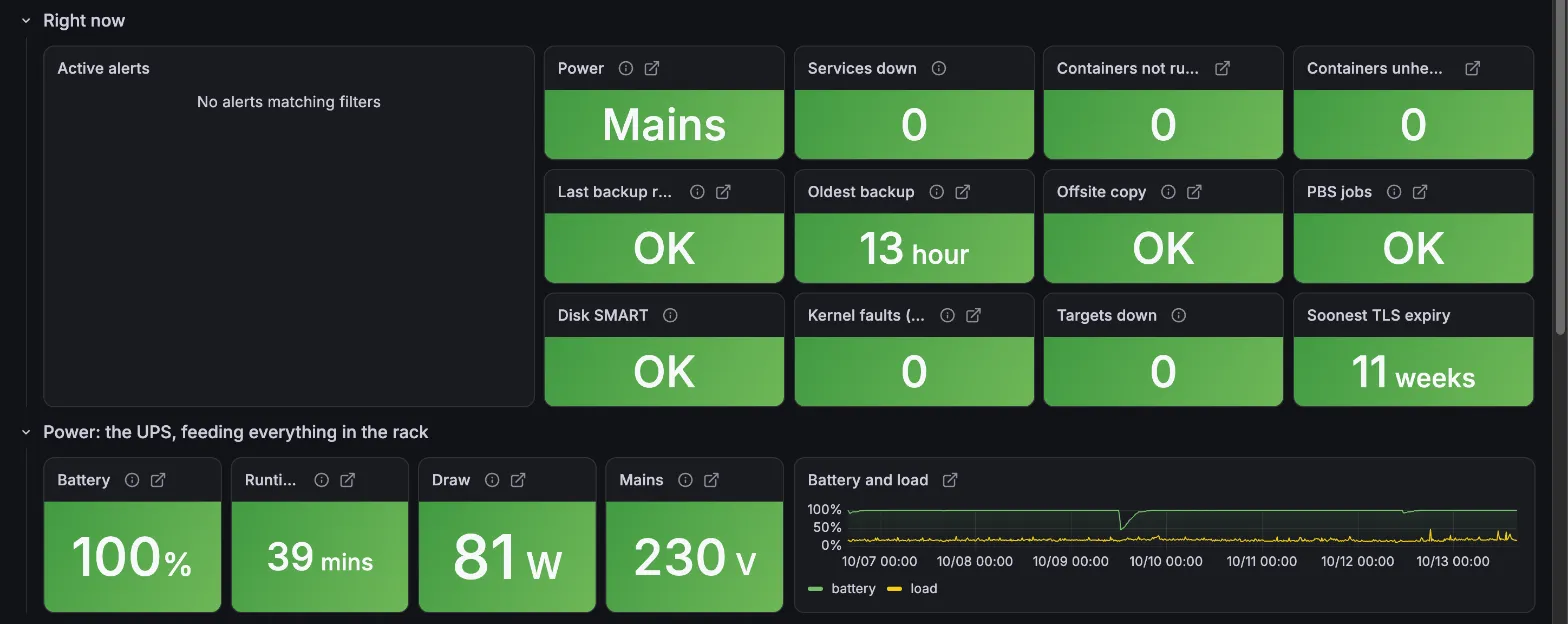
Prometheus, Loki and Grafana run on docker-core. Alerts go out by email through Cloudflare’s Email Sending API, so their delivery doesn’t depend on the lab, and a watchdog on the DNS guest checks docker-core while docker-core checks it back.

A tip if you run node-exporter in an LXC: it reports the host’s numbers as its own, because /proc is partly faked by lxcfs and /sys isn’t namespaced. Disable its host-reading collectors and let the hypervisor publish those metrics.
What I accept
My target is to lose at most 24 hours of data, and to recover in hours from a software problem or in days from a hardware one. There is no uptime promise. That is why there is no RAID and no high availability: neither would change those numbers.
The rest follows from having one box. If the hypervisor dies, the watchers die with it and nothing tells me. And when the rack is down, my Mac is a laptop with nothing to work on.
The agents on those dev boxes also write the lab itself, in sessions I supervise, and I read each change before it lands. That is its own post.
Discussion on r/homelab.
Icons in the diagrams: Simple Icons (CC0) and Lucide (ISC).